Aleph Glue
Published on October 13, 2026
Aleph Glue is a Fooyin layout centered around making use of an entire screen, communicating useful information without wasting screen space.
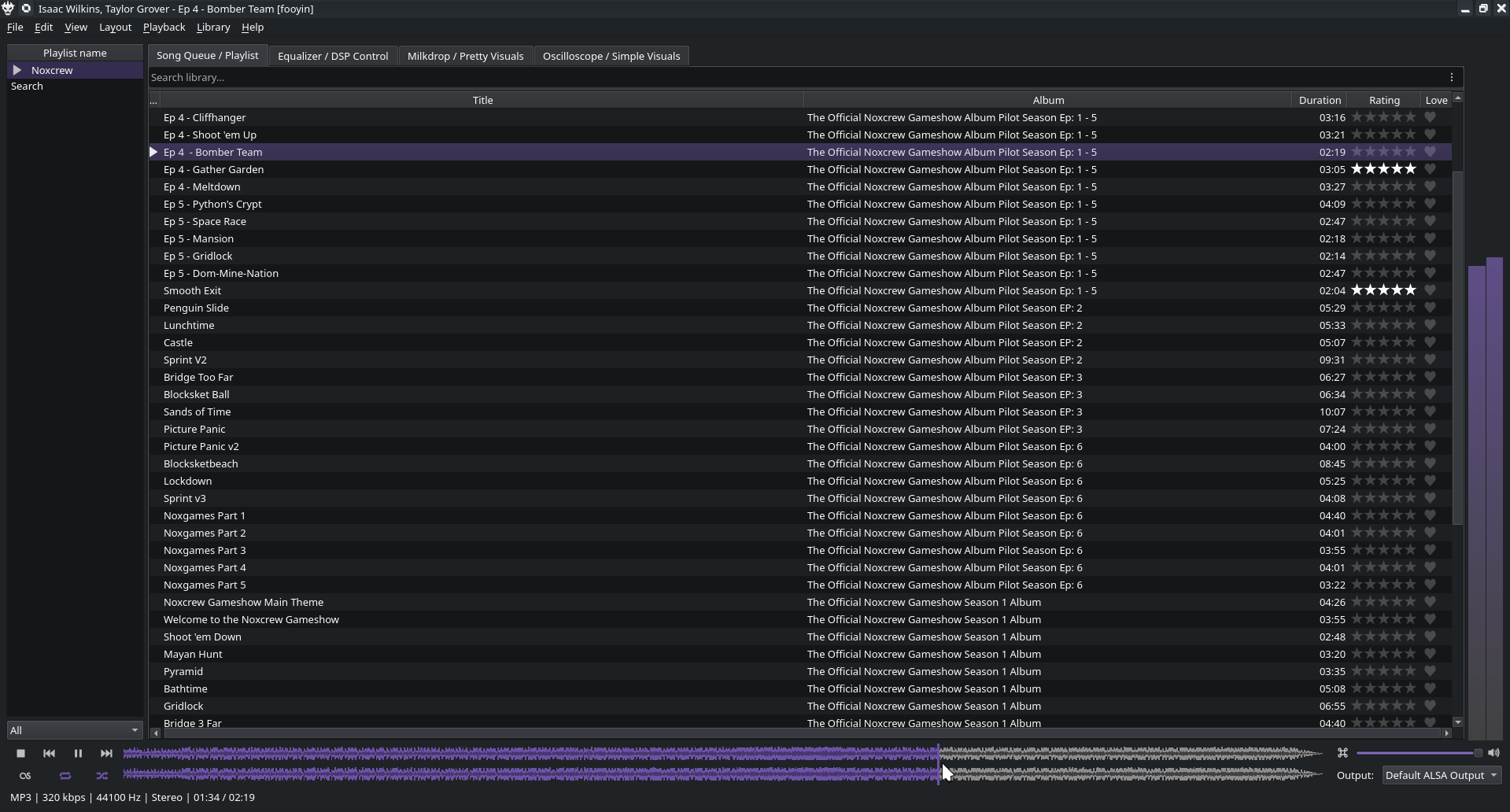
Description
The layout has information placed strategically around the player in order to keep it useful and out of the way; it's designed to be used as a full-screen player, but with some effort spent in resizing (and possible removing the Album header if you wish to use playlists as individual albums and scrobble between them), it works well windowed as well.
Brief tour
On the left, you have a list of playlists to switch between, as well as an extra entry for your search results using the search bar (noted later). Right-click here to add or remove playlists.
On the bottom, you have all the typical player controls: Play/stop/skip tracks, playlist management, as well as a scrobble toggle button if you use a scrobbling service. The normal seekbar has been swapped for a fancier waveform seeker, letting you find the drop in a song a lot easier. I've also added volume controls (including a mute button) and an output selector on the right, to help your smooth jazz get to the set of speakers/headphones it needs to reach, as well as Fooyin's ReplayGain setter.
On the right, a volume meter helps you protect your ears, letting you know if stuff's getting too loud.
The real meat of the player is the window in the middle, taking up most of the screen space. It has four tabs:
> The first - and main - tab is the playlist editor. You select (or create) a playlist on the left, then edit it in the main screen to add or change songs. The default layout also adds rating and heart buttons for each song.
> The second tab is an equalizer, for those who think the song needs more/less bass. Or other audio fixes. There's also sliders for messing with the song's tempo, pitch, or playback rate if you feel extra silly.
> The third tab is a Milkdrop visualizer via ProjectM. If you're a Winamp fan or want something to put on the screen for your next party, this is for you! (warning: if you install FooYin without ProjectM support, left-clicking this tab will immediately crash your player - you can just right-click the tab and hit Remove to get rid of the tab if that's the case)
> The final tab is affectionately named "Simple Visualizers" because it cuts the fanciness out and goes back to simpler times: You get an oscilloscope, a spectrograph to catch hidden images, a spectrum dump so you can see what you're hearing, and another VU meter with volume labels so you can see how loud everything is.
How to use
Right click this link, hit Save As, and save the file somewhere you’ll find it later. (If you save it in /.config/fooyin/layouts, it’ll show up in Fooyin’s layouts selection) Open Fooyin, go to Layouts -> Import Layout… and choose the file you just saved.